Tracing KadNap: The Malware Behind Doppelganger's Proxy Infrastructure

Doppelganger is a proxy service that sells access to residential and business IP addresses. Customers using it can select an IP based on its location, internet service provider, and connection speed, then use that connection to route their own traffic.
The problem is where those IP addresses come from.
Doppelganger is associated with KadNap, malware that infects routers and other network-connected devices, turning them into proxy infrastructure. The device owner doesn't need to install a proxy application or agree to share their connection. The malware handles that.
In March 2026, Lumen's Black Lotus Labs published its investigation into KadNap, reporting more than 14,000 infected devices, primarily ASUS routers. The malware uses a customized Kademlia distributed hash table (DHT) implementation to find command-and-control infrastructure without relying on a fixed server address.
Spur built on Lumen’s initial investigation by identifying other targeted device families and six different strains of the malware not covered by initial reports. This greatly expanded our understanding of the connection between KadNap and Doppelganger.
From the several KadNap samples we recovered and analyzed, we determined how the malware infects and operates on devices post-infection. That work gave us a closer look at the installation process, DHT discovery mechanism, encrypted control traffic, and proxy relay functionality.
Here's what we found.
Doppelganger's Proxy Network
Doppelganger is a rebrand of Faceless, a proxy service previously associated with TheMoon malware.
Its storefront advertises residential and business IP addresses, allowing customers to select locations, ISPs, and connection speeds. Purchases are made using cryptocurrency exclusively.
At the time of our investigation, the storefront advertised approximately 11,000 available IP addresses. Our own research indicated a footprint roughly two to three times larger than the advertised inventory.
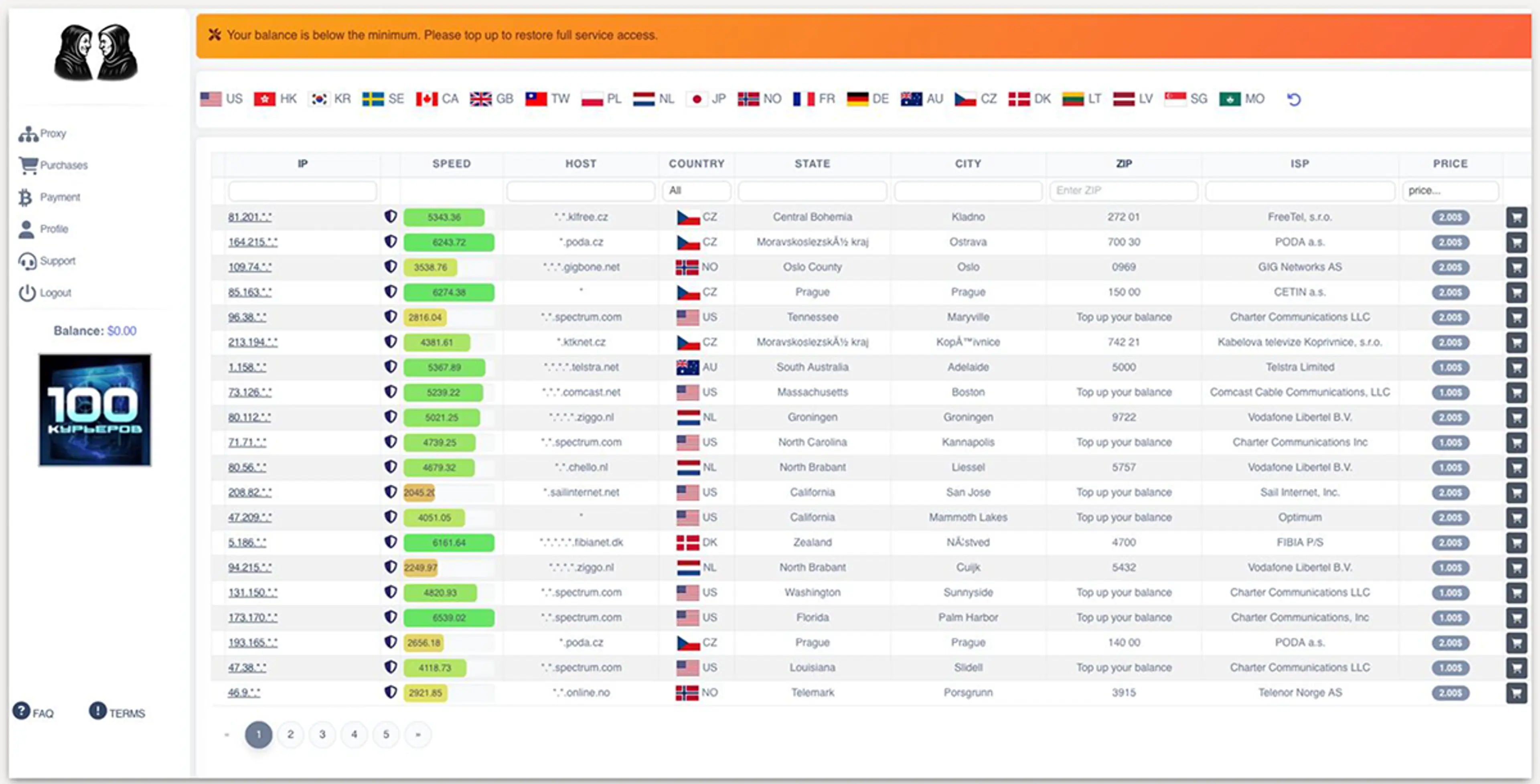
The devices associated with the network weren't limited to residential routers.
We identified infrastructure associated with several types of equipment:
- Routers: ASUS
- Network-attached storage: QNAP, Seagate, and Synology
- Camera management systems: Digital Watchdog QSG, Uniview
The range of hardware is important because the malware needs to run on devices with different processor architectures and operating environments.
We haven't established the infection method for every device type. However, we know that most of the malware group’s current efforts appear to be focused on infecting Uniview camera systems.
Regardless, the samples we recovered let us examine what happens after KadNap is installed and how an infected device connects to the rest of the botnet.
From Mirai to KadNap: Investigating the Malware
Our investigation started in Spur's router lab.
We equipped Asus routers in a lab with logging and packet capture capabilities to observe what happens when vulnerable network equipment was exposed to the internet and subsequently infected.
The first recurring infections we encountered were Mirai. Those infections, while unwanted, allowed us to capture malware delivery mechanisms and examine the servers distributing malicious files.
We later finally secured our first KadNap samples. Following the infection back to the distribution infrastructure led us to additional variants, which we could compare in a separate analysis environment.
In total, we recovered six files representing five build identifiers and two implementation families.
The recovered binaries included ARM32 Thumb-2 and MIPS32 little-endian implementations. Their sizes and internal structures varied considerably, suggesting that the operators maintained more than one implementation of the malware and were actively iterating to meet specific functionality demands of their users.
For our dynamic analysis, we used separate ARM cloud instances to execute and observe a full KadNap build. We then compared the network captures against what we'd identified through static analysis and reversing efforts.
This gave us three useful points of comparison:
- What the recovered code was designed to do.
- What happened when we executed the analyzed ARM build.
- What core functionality was absent between recovered samples.
Our runtime observations apply only to the ARM full build we tested. Findings about the remaining samples come from static analysis rather than equivalent dynamic execution.
How devices become infected
Our honeypots captured exploitation attempts targeting ASUS routers, including file-write and command-injection behavior using custom HTTP request verbs.
We have also since independently confirmed exploitation of Seagate GoFlex and related NAS devices running Axenta firmware; specifically using an XML External Entity to remote code execution chain (CVE-2018-18471).
The exact infection path for the Digital Watchdog and Uniview camera management devices remains unconfirmed.
These observations help explain how KadNap can reach different equipment, although they don't establish a complete infection chain for every device associated with Doppelganger.
Once installed, the malware follows a more recognizable sequence.
How KadNap Persists on ASUS Routers
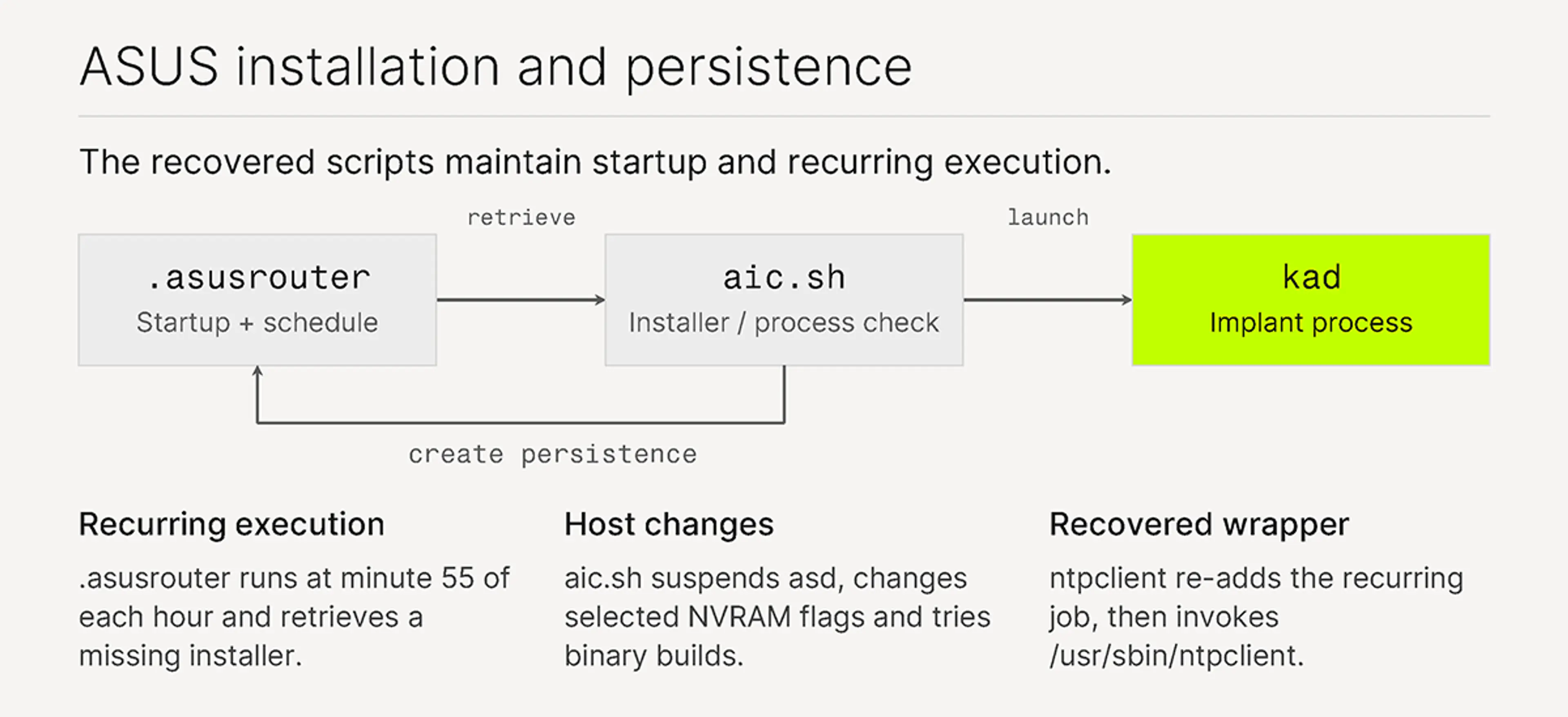
The ASUS installation scripts we recovered establish recurring execution and retrieve the malware implant.
Three components are central to that process:
.asusroutermaintains the startup and recurring execution mechanism.aic.shacts as the installer and checks the malware's execution state.kadis the implant binary launched by the installer.
The recurring job runs at minute 55 of each hour and retrieves the installer from the distribution servers when needed.
The installer also suspends the asd process (ASUS Security Daemon), modifies selected NVRAM configuration flags, and attempts to launch the retrieved malware binary.
We identified another persistence mechanism involving a modified ntpclient wrapper. That wrapper can restore the recurring job before invoking the system's original time synchronization utility.
The result is a persistence arrangement that gives KadNap multiple opportunities to restore execution.
What happens next is more interesting.
Rather than contacting a single hardcoded command-and-control server, KadNap uses a distributed discovery process to determine where it should connect.
KadNap Uses Kademlia to Find Its Control Infrastructure
Kademlia is a distributed hash table protocol used by legitimate peer-to-peer applications.
Instead of maintaining a single directory of every participant, a distributed hash table allows nodes to locate information and peers by querying other nodes. This works very efficiently because nodes that are the most ‘similar’ are returned by peers you query while walking through listings. This is referred to as “XOR Distance”.
This can let a node find a peer within a dozen lookups or less anywhere in the world, and KadNap makes use of this general mechanism to discover candidate control infrastructure endpoints.
In the ARM build we analyzed, the malware starts by performing several network initialization tasks.
It uses STUN to help establish its public-facing address and NTP to obtain and sync time information. It then connects to the public DHT through known BitTorrent bootstrap nodes.
The malware then uses find_node requests to establish a view of the routing network and sends randomized get_peers queries to refresh that information.
Our analysis showed approximately five to fifteen randomized get_peers queries during routing refresh activity.
None of these protocol operations are inherently malicious. STUN, NTP, and DHT lookups are all used by legitimate software.
KadNap's distinctive behavior is how it calculates the lookup value used to find its control infrastructure.
A lookup value that changes every three hours
KadNap uses a time-dependent calculation to generate an info_hash for its DHT queries.
The process begins with the current Unix timestamp and an embedded 64-byte key. There are currently two 64-byte keys in use by the malware family:
R3: SfdHWRYy2fUd2WdH9MGvD4vtVDduAPrXxeDuwsxfa8T74FF4nXRDGKSgG6E57XnZR1: 6YL5aNSQv9hLJ42aDKqmnArjES4jxRbfPTnZDdBdpRhJkHJdxqMQmeyCrkg2CBQg
The timestamp is rounded down to the nearest three-hour window. The malware then combines that time value with its key material using XOR operations and SHA-1 calculations.
The result is incorporated into a bencoded structure, which is hashed again to produce the final DHT lookup value. For those interested in an approximation of the math:
Time0 = T - (T % 10800)E = BigEndian32(Time0)X[i] = Key[i] XOR E[i % 4]P = SHA1(X)N = hex8(Time0).encode("ascii")B = “d6:lengthi64e4:name8:” + N + “12:piece lengthi32768e6:pieces20:” + P + “e”H = SHA1(B)
The important part is that this hash calculation is deterministic and rotates every three hours.
Devices using the same key material during the same three-hour window calculate the same lookup hash.
This gives the malware a way to find a shared rendezvous point without storing a conventional fixed command-and-control address in every binary. It also derives the current port to connect to from the first few bytes of the current three-hour hash.
Our analysis showed that the malware begins querying the calculated hash after approximately five minutes. The parent process also applies throttling to connection attempts, with an interval of approximately 600 seconds.
The recovered samples contained different rendezvous key lineages, which we identified as r1 and r3.
These differences matter when comparing samples. Two binaries may implement similar discovery logic while calculating different lookup values.
Discovery and control run separately
The malware separates DHT discovery from the process responsible for making the control connection.
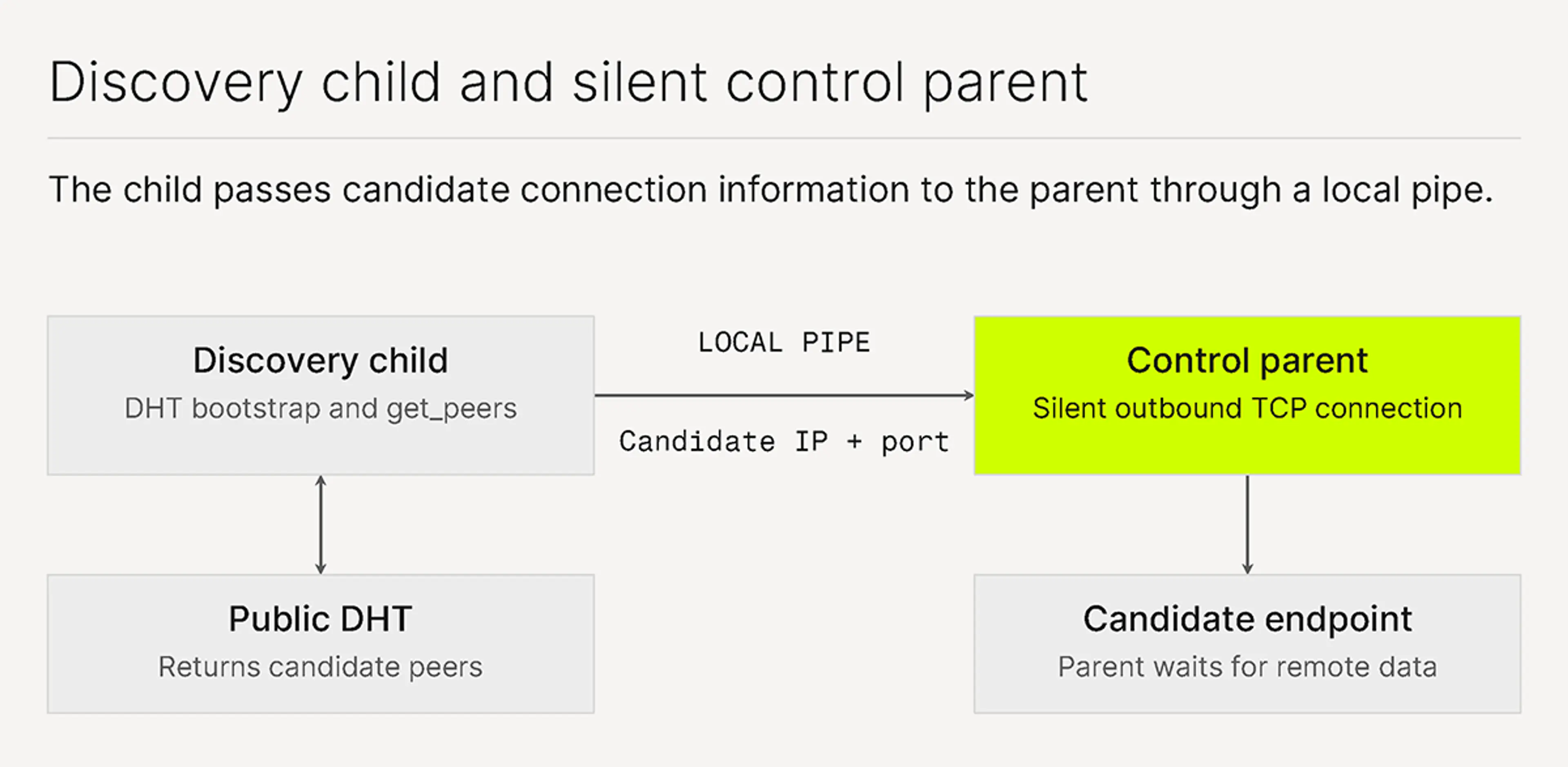
A child process performs the DHT operations and receives candidate endpoint information. When it identifies a candidate, it sends the IP address and port to the parent process through a local pipe.
The parent then establishes the outbound TCP connection. This separation is useful to understand when examining the malware's traffic.
The DHT activity is responsible for finding candidate endpoints. The outbound TCP connection is where the subsequent control exchange takes place.
The DHT does not replace the command-and-control infrastructure. It is purely designed as a way for the malware to find it.
The TCP Connection Starts With Silence
When we executed the ARM full build and captured its traffic, one behavior stood out.
The parent process established a TCP connection to the candidate control endpoint but sent no initial application data.
The server always spoke first.
In the observed exchange, the remote endpoint sent signed session-key material. The malware verified that material before continuing with encrypted control communications.
The subsequent messages used a format containing two-byte total-length and payload-length fields followed by an AES-encrypted body.
This behavior is worth noting because an outbound connection from an infected device does not necessarily begin with a recognizable application request, which differs greatly from typical BitTorrent network traffic where peers announce themselves after connecting.
An analyst examining only the first client-to-server application payload would have little to work with here.
The connection becomes more informative when correlated with the preceding DHT lookups, the destination infrastructure, and the encrypted exchange that follows.
Our captures showed this sequence in the analyzed build. They don't establish that every KadNap implementation uses an identical control exchange; however, static analysis supports this observation across their malware family.
The Control Channel Delivers Two Different Configuration Files
After the malware establishes its control session, the operator can deliver additional files to the infected device.
Our captures contained two payloads with distinct purposes.
/tmp/fwr.sh: Changing the host configuration
The first file was /tmp/fwr.sh.
This script was delivered and executed on the infected device. In the captured version, it restricted inbound SSH access on TCP port 22.
We observed the file could be replaced repeatedly during control activity.
This appears to be the primary mechanism for arbitrary command execution and modifying the infected device's configuration after the initial infection.
/tmp/.sose: Configuring the proxy relays
The second file was /tmp/.sose.
Unlike fwr.sh, this file was delivered as configuration data rather than executed directly.
The version we captured was 20 bytes long and contained two relay entries.
In the full KadNap implementation, the malware reads the .sose file and creates a worker for each entry.
Each worker opens an outbound connection to its configured relay. This file was retrieved again whenever it was missing or deleted.
That difference suggests the two files serve separate operational purposes: one changes host behavior, while the other supplies the relay configuration the malware uses.
The relay behavior is particularly relevant to Doppelganger.
A compromised device needs more than a command-and-control connection to function as a proxy. It needs a way to relay traffic through infrastructure operated by the service.
The .sose handling and outbound relay workers show how the full KadNap implementation supports that functionality.
Full and Compact KadNap Builds
The recovered samples also showed differences in how the proxy functionality was implemented.
We grouped the binaries into two implementation families: full and compact.
| Property | Full implementation | Compact implementation |
|---|---|---|
Recovered architecture | ARM32 Thumb-2 | ARM32 and MIPS32 little-endian |
Identified functions | Approximately 1,350–1,450 | Approximately 660–705 |
Proxy implementation | SOCKS5 backconnect with multiplexing | Reduced |
Additional relay AES layer | Present | Absent in the compared code |
The full implementation contains substantially more runtime code and a more extensive proxy-handling mechanism.
The compact implementation is smaller and lacks the additional relay AES layer present in the full implementation we examined.
We also identified different rendezvous key lineages across the samples.
These findings establish that the recovered binaries aren't simply identical malware compiled for different processors.
They contain implementation differences that affect their functionality.
We can't determine from this sample set alone why the operators use each implementation or how they decide which devices receive which build.
Artifacts We Found During the Investigation
Several filesystem artifacts help connect the installation, persistence, and relay mechanisms.
| Artifact | Observed Role |
|---|---|
| ASUS persistence script |
| Malware implant locations |
| Restores recurring execution and invokes the original utility |
| Infection and delivery scripts |
| Host configuration changes, including SSH restrictions |
| Proxy relay configuration |
The paths are useful investigation leads, but they should be evaluated alongside file contents, process behavior, and network observations.
A filename by itself doesn't establish that a device is infected with KadNap.
We also identified malware and script delivery servers, along with active control infrastructure, during the investigation.
Those network indicators require point-in-time validation before being used for current detection. Infrastructure observed during our analysis may no longer serve the same role.
What This Tells Us About Doppelganger
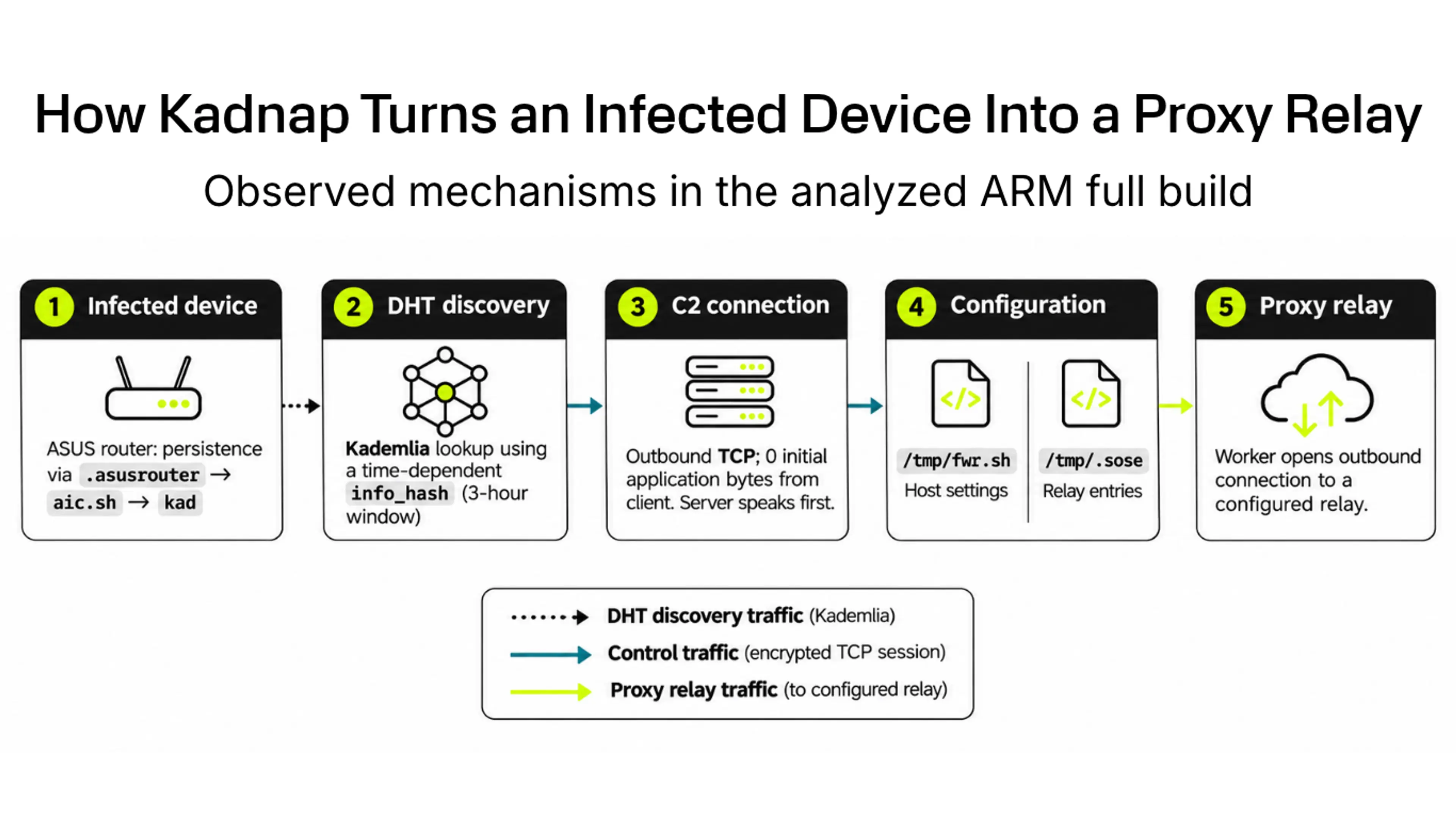
Doppelganger's storefront and KadNap's internal operation are two sides of the same service.
From the storefront, a customer sees a list of available IP addresses with location, provider, and speed information.
On an infected device, the underlying process is considerably more involved.
KadNap maintains persistence, initializes its network state, calculates a time-dependent DHT lookup hash, discovers candidate control endpoints, establishes an encrypted connection, and retrieves the configuration needed to connect to proxy relays.
Our analysis provided direct visibility into those mechanisms.
It also showed why examining only one part of the traffic can miss the relationship between them.
A DHT lookup alone doesn't establish malware activity. A silent outbound TCP connection doesn't prove a compromise. A residential IP address doesn't tell us who initiated the traffic passing through it.
But when those observations are correlated with the recovered malware, its execution behavior, and known Doppelganger infrastructure, they help explain how the network operates.
This is also why identifying residential proxy infrastructure requires more than determining whether an IP address belongs to a consumer ISP.
The device behind that connection may be performing work for a completely different actor.
Conclusion
We started with infections captured in our router lab and followed the recovered malware through its installation and runtime behavior. We uncovered how that malware moves from an infected device to an operational relay.
While questions remain regarding initial infection vectors for certain device families and specific build selections, our analysis demonstrates how KadNap supports the proxy network behind the scenes.
The proxy customer sees an ordinary IP address. The device owner may see nothing unusual. The work of connecting the two happens inside the malware and the infrastructure controlling it.
Indicators of Compromise
Observed C2 Servers
190.97.167.128
Observed Malware Distribution Servers
88.119.175.67216.146.25.20179.141.162.2
Malware Staging Scripts
aic.shanp.shsto.sh
MD5 Hashes
045f0810df28100fb2cb3bf2f1a8c266133b382e162c2f4a2c353650468e83c82d2c38edcd7581de477ecebfba657b43402559e0302bb9c8ac45401ae74bf0e77f8f455161cde85d5b6b71c6b26684d4857877becdf15da4c100592803ead9e1945a43d4867c321d3230cd5c17e2e13395578d55e7affee1db646578b1eea7baf4f162c9836e9f715ecb8e0e1f3a875a2211eb390424ec81f0e5a27e2b710dcc2daefc69e7cd897f86a385a041f089d45e0ab4ab2b53e8e1dbb74dd97c03979d763a720a3813883640a34d102c7efe66
SHA-256 Hashes
bb15d65f3222090bfd534ad27960c580b11792ab5d17888df99cfe5f4fc93c440c374e5d0f898043b9d3a7376ded59e80c368af25a2b89c469702ed102ffb965270ec9ec455b5997e463764aaf58f353a5aa7b505f4008bfa5f71e9284ae2a3870d3096b6f6085e542cb91ec0a290e043c621207f7a117e6486e54317d89b82e9465e0195e9829ec0decd6957aedc73898ab5d6f6c275d0b972fb7aee5eb73a8a773b9e55fb33aff4ba609db70ef52bcef3830ace98dda7b902b31a1a0aa605dbb15d65f3222090bfd534ad27960c580b11792ab5d17888df99cfe5f4fc93c44f91f45eca8e13080f764ca02d650d39a2d79b419aa4f9bec531ef9a8a5cd76abfabba0def129b717c55f6f1eabbf7f05eda90b2d4be9878bd7b4e856ac6d03c3fce49e8489d7cccf48df05b078f7ce97cc9d1f216b070eac2ca659e6bb52e92a0b3dbb951de7a216dd5032d783ba7d0a5ecda2bf872643c3a4ddd1667fb38ffe699274f45f36352b20cf878f57840b1ea21649bf52f66edf19db7ef73a2b5316d02d9058e0f4ed2aab292f6610f412edadbbeea9cc45a508af4a90cd0e47631fe04185c48401d2ef9777cea79d165cfbd78dfc454fecccb75f2b0f6396c17cc6
AES Keys
jV9YUDanATgt9E8Sd39jPEFgSaxDWbmV # R3qFHV7xjr8XprzZsd26yUJ3vAYQUHprbG # R1
DHT Hash XOR Keys
SfdHWRYy2fUd2WdH9MGvD4vtVDduAPrXxeDuwsxfa8T74FF4nXRDGKSgG6E57XnZ # R36YL5aNSQv9hLJ42aDKqmnArjES4jxRbfPTnZDdBdpRhJkHJdxqMQmeyCrkg2CBQg # R1
See the Difference Between Raw Data & Real Intelligence
Start enriching IPs with Spur to reveal the residential proxies, VPNs, and bots hiding in plain sight.