Monetizing the Last Mile: How Proxy Providers Co-Opt Entire Networks
Sean S.06.08.202623 minute read
Introduction
If you’re familiar with residential proxies, you probably understand them in their usual form: get-paid-to apps, monetization SDKs, browser extensions, trojanized IoT devices, and outright malware that turn an individual user's home connection into an exit node, very often without that user's informed consent.
Using a different model harder to spot from the outside, "ISP proxies" advertise themselves as "static residential" addresses: IP space registered to real Internet Service Providers and Autonomous Systems, routed through proxy vendor infrastructure (e.g., datacenter hosting) rather than through consumer electronics.
NetNut is one of the largest operators in this category, though using a different technique altogether. Public marketing emphasizes direct ISP partnerships, one-hop connectivity, and over one million static residential IPs. What the marketing materials do not emphasize is the underlying mechanism: Generic Routing Encapsulation (GRE) tunneling and policy-based routing (PBR) configurations installed on partner networks, which can effectively re-lease an organization's entire public IP allocation to paying NetNut customers.
When this configuration is in place, anyone with a NetNut account (or with access through numerous resellers) can route traffic out of that address space. Unlike traditional residential proxy schemes, the real users assigned those IPs never install anything, click anything, or opt in at all. Yet all the same, they inherit the reputational, security, and legal fallout when strangers browse, scrape, or commit fraud from addresses that belong to their ISP, enterprise, or even their educational institution.
This post walks through how that works, with a case study on Howard University's/16 allocation.
On-Demand Webinar | Static ISP Proxies: The Fake Residential Networks
Join us for a technical discussion on static ISP proxies, how these networks are sourced, and how teams can detect proxy-enabled activity without blocking legitimate users in affected ranges.
Background: NetNut, DiviNetworks, and the "ISP Proxy" Market
NetNut positions themselves as a premium proxy provider offering:
Static residential (ISP) proxies: stable IPs sourced from ISP partnerships
Rotating residential proxies: larger pools, sourced from traditional residential proxy sources and partners
Datacenter proxies: Old school, datacenter-based proxies
Mobile proxies: Leveraging 5G/LTE and other mobile networks, often powered by large-scale SIM farms
DiviNetworks was founded in 2004 in Tel Aviv by Barak Avitbul and Hayim Shaul. The company built relationships with ISPs and network operators, originally around bandwidth optimization and delivery, and later around monetizing unused address space. NetNut grew out of that work: an early residential proxy business built on DiviNetworks' ISP partnerships rather than on end-user devices (at least initially; their business and offerings have significantly expanded, as noted above. They have white labeling relationships with many other residential proxy providers, but that's a topic for another blog).
NetNut and DiviNetworks are related, but they are not the same company today.
In June 2019, Safe-T Group (now Alarum Technologies, NASDAQ: ALAR) acquired NetNut Ltd., along with certain assets from DiviNetworks required to run the proxy operation. NetNut has been an Alarum subsidiary since. DiviNetworks continues separately, recruiting ISPs through its Divi Group partner program while NetNut sells the resulting proxy access to customers and resellers.
NetNut is transparent (after a bit of digging in the FAQ) that its static residential product is powered by DiviNetworks infrastructure. Third-party reviews and NetNut's own site describe this as a feature: direct ISP connectivity yields faster sessions, fewer device dependencies, and higher trust scores on target sites.
NetNut FAQ expanding on DiviNetworks' relationships with ISPs
From an abuse and attribution perspective, the same properties are liabilities. Traffic originating from a university, regional ISP, or enterprise ASN carries the institutional reputation of that network. Fraud prevention systems, law enforcement, and platform trust teams treat such space differently than they treat obvious datacenter ranges. That is why customers pay for it; this is the entire market behind residential proxies of all stripes.
DiviNetworks recruits those ISP partners through its Divi Group brand with a straightforward pitch: a new revenue stream in fifteen minutes of integration on MikroTik, Cisco, or Juniper, with more than 150 ISP partners already enrolled (there's some discrepancy on the total number; NetNut claims 100+, DiviNetworks claims 150+)
Divi Group homepage recruiting ISPs with a revenue-stream pitch
DiviNetworks does not publicly document the router configurations that partners install. Instead, configuration diagrams are provided on their website, showing how the integration works.
How It Works: GRE Tunnels and Policy-Based Routing
DiviNetworks terminates a GRE tunnel on the partner's edge, installs software on a VM inside the partner network, and uses policy-based routing to steer a slice of traffic through that VM and back out through NetNut's infrastructure. Return traffic for NetNut-initiated sessions is routed back through the GRE tunnel.
The partner keeps normal routing for everything else. From the partner's perspective, a small amount of traffic is "diverted." From NetNut's perspective, selected egress from the partner's public IP space becomes a commercial proxy product.
MikroTik Configuration
The following MikroTik RouterOS commands illustrate a typical deployment. The remote endpoint resolves to a Divi-controlled host; the local side is the partner's public IP.
A GRE tunnel named DIVINET-GRE is established between the partner router and DiviNetworks using the configured public IP addresses.
The tunnel is assigned a dedicated point-to-point /30 network, with the partner router using 10.254.254.1 and the DiviNetworks endpoint using 10.254.254.2.
A separate routing table named DIVINET-TUNNEL is created and configured to reach DiviNetworks through the tunnel endpoint at 10.254.254.2.
When traffic arrives from DiviNetworks through the GRE tunnel, RouterOS records that connection using a connection mark named DIVINET-RETURN.
Subsequent packets associated with those marked connections are assigned a routing mark that causes route lookups to occur in the DIVINET-TUNNEL routing table.
This ensures that traffic associated with connections received through the tunnel is returned through the same tunnel, maintaining symmetric routing between the partner network and DiviNetworks.
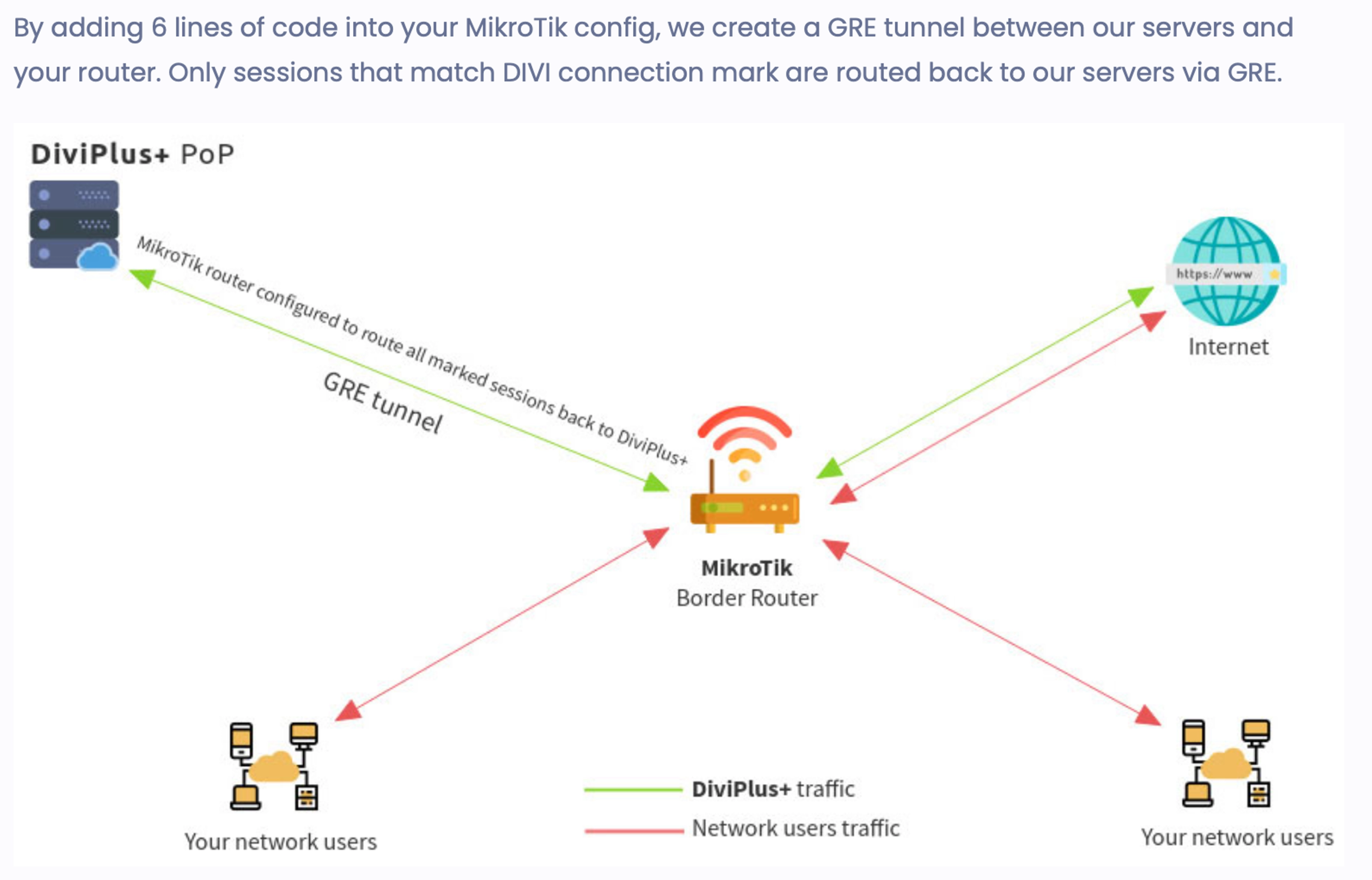
No one on the network opts in individually. The border router marks Divi sessions and sends only that traffic through the GRE tunnel; everything else keeps the normal path.
Divi's partner documentation describes the same model visually: a couple of lines of MikroTik configuration create a GRE tunnel to Divi infrastructure ("DiviPlus+ PoP" in the below diagram), and only sessions carrying the DIVI-RETURN connection mark are routed back through it.
DiviNetworks MikroTik GRE tunnel diagram: marked sessions routed to DiviPlus+ PoP
Juniper Configuration
Divi's documentation to partners also describes a VM-based deployment on Juniper gear. The VM maintains session state (source/destination IPs and ports, sequence numbers, and related metadata) and returns NetNut-originated flows over GRE. The edge router runs PBR to redirect matching traffic to the VM.
Partners are told that only a limited source port range (40000-40200) is used for NetNut sessions, so "misdirected" return traffic should be negligible, on the order of 0.2% of total volume.
Representative Juniper filter configuration:
set firewall family inet filter DIVI term accept-ok from destination-address [network]
set firewall family inet filter DIVI term accept-ok from source-port http
set firewall family inet filter DIVI term accept-ok from source-port https
set firewall family inet filter DIVI term accept-ok from destination-port 40000-40200
set firewall family inet filter DIVI term accept-ok then next-ip [vm addr]
Replacing [vm addr] with the DiviNetworks VM address and [network] with the address block(s) to be redirected.
The filter matches:
Traffic destined to the partner's advertised networks
Common web ports (HTTP/HTTPS as source ports in this filter design)
Destination ports in the 40000–40200 range used for NetNut session signaling
Matching packets are forwarded to the Divi VM rather than handled locally.
On Juniper and Cisco deployments, partners must provision a VM; Divi installs software remotely that terminates the GRE tunnel. The router's PBR redirects what Divi describes as a very small fraction of traffic (0.2%) to that VM.
DiviNetworks Juniper/Cisco deployment: VM, GRE tunnel, and PBR on the border router
Partner-Specific GRE Endpoints
The MikroTik template is not generic in the sense that each integration uses a partner-specific subdomain on divinetworks.com as the GRE remote-address, likely following the pattern rtr-<partner>.divinetworks.com. That hostname resolves to one of a small set of DiviNetworks tunnel terminators.
We collected a non-comprehensive sample of these endpoints from passive DNS:
DiviNetworks endpoint
Resolved IP
rtr-plainsinternet.divinetworks.com
131.153.71.34
rtr-blubroadband.divinetworks.com
131.153.71.34
rtr-celltexnetworks.divinetworks.com
208.72.111.230
rtr-rioonline.divinetworks.com
131.153.71.90
rtr-grice.divinetworks.com
131.153.71.34
rtr-mtnbb.divinetworks.com
131.153.71.34
… (30 partner endpoints in sample)
Most entries in this list resolve to a handful of DiviNetworks PoP addresses (131.153.71.34, 131.153.71.90, 131.153.23.36, and others), suggesting centralized tunnel termination with per-partner naming for onboarding and operations.
One entry is rtr-plainsinternet.divinetworks.com, the GRE endpoint assigned to Plains Internet, a small regional ISP in Amarillo, Texas. We were able to connect that infrastructure indicator to live proxy egress from Plains address space (see below).
We did not find a rtr-howard.divinetworks.com (or similar) entry in this sample. This is possibly due to a pDNS shortcoming. It could also be that the Juniper/Cisco methodology doesn't require the setup of a partner-specific domain at any point, unlike the Mikrotik configuration. Live proxy testing confirms Howard egress regardless.
Router-Level Enrollment, Not Host Infection
This is not unauthorized access in the malware sense, or even dubious access in the SDK-embedded-in-your-favorite-mobile-game sense. Someone with routing authority on the network chose to implement the configuration: the ISP itself, a contracted managed service provider, or an internal team operating without broader organizational awareness.
Unlike residential proxies built on infected devices or consent-bypassing apps, end users here did nothing. They never installed software or agreed to terms. The change lives on the edge router, not their laptop or phone, so it is invisible to endpoint security and essentially invisible to the people who actually use the network. The scope is different too: not one household IP, but potentially an entire announced prefix, controlled by whoever holds the router config.
When implemented across a large prefix, the model does not lease a few spare or unused IPs. It turns every address in the announced block into potential commercial egress inventory, subject to NetNut's session allocation and customer demand.
Customers purchasing "US static residential" or "ISP" proxies may receive IPs registered to an educational institution, regional provider, or enterprise, and “browse” the internet as that institution.
The Incentive Structure
DiviNetworks entices network operators with a public revenue calculator. For a /16 in the United States (65,536 addresses), the calculator estimates $13,208 per month at a stated assumption of 1 GB of data usage per IP. The same page notes that DiviNetworks "do not need IP allocation" and that operators can monetize both used and unused prefixes.
DiviNetworks revenue calculator: $13,208/month estimated for a US /16 at 1 GB/IP
That figure turns a niche technical integration into a significant recurring revenue stream relative to many ISP and university IT budgets. For a third-party managed services provider administering routers on contract, the incentive is obvious: the customer organization may never be aware, while the MSP or a complicit insider collects ongoing payments.
NetNut customers, meanwhile, pay premium rates for trusted, stable, geographically authentic IPs, funded in part by the gap between partner payouts and retail proxy pricing.
The KYC Mirage
To reassure network operators considering integration, DiviNetworks publishes a customer FAQ aimed at partners. It states that DiviNetworks buys unused bandwidth and monetizes it with enterprise customers only. The listed examples include names like eBay, WeWork, Kiwi, and Flight Network. The same document draws a bright line on who is not a customer: "Individuals, end users, freelancers. Anyone who is not a verified corporation."
DiviNetworks partner FAQ claims customers are verified corporations only, not individuals
The retail product does not match the pitch. NetNut does not require corporate verification or meaningful KYC to purchase proxy access. An individual can sign up, pay, and route traffic through partner address space, including space belonging to institutions whose users never opted in. The "verified corporations only" claim is simply marketing for bandwidth sellers, not an access control on who actually uses the proxies.
Nor is NetNut the only front door. A number of downstream white labelers and resellers repackage the same ISP proxy pool under their own brands. These outlets typically perform no KYC at all, less scrutiny than NetNut itself, who at the very least might assign an account manager to potential users. Anyone who knows where to look can buy access through a reseller with nothing more than a burner email address and $5 in crypto.
Partners who integrate based on that reassurance should understand what they are actually exposing their prefix to: paying proxy customers in general, routed through NetNut and its resellers alike, not a vetted shortlist of Fortune 500 scrapers.
Observing Live Proxy Egress
Our research affiliates routed test requests through NetNut and queried a public IP echo API (ip-api.com/json) to identify the exit IP, ASN, and registered organization.
The examples below are from ordinary commercially purchased proxy sessions sourced from NetNut's static residential proxy offering. Each request went out through NetNut's network and came back with exit metadata identifying the partner's IP space.
Howard University (AS919): Prefix-Scale Measurement
Below is an example curl showing Howard University's IP space being used as egress.
curl through NetNut proxy: exit IP 138.238.98.24, ISP/org AS919 The Howard University
The response identifies:
Exit IP: 138.238.98.24
Org: The Howard University
ASN: AS919
We observed ~80,000 requests through NetNut's static residential proxy pool (without geo specification) and recorded the exit IP on every response. Those sessions exited through a mix of ASNs and organizations globally; ~17,000 of them (roughly 21% of the sample) egressed through Howard's 138.238.0.0/16 space (AS919), yielding ~15,000 distinct Howard exit IPs.
The distribution tracks BGP, not random occupancy of the /16:
224 / 224 announced /24 subnets under AS919 had at least one observed proxy exit
Exit distribution was random and uniform throughout each subnet
None of the 32 /24s in Howard's unannounced gaps (138.238.0.0/20, 138.238.208.0/21, 138.238.248.0/21) had any observed exits (which makes sense)
The NetNut pool covers what Howard announces to the internet. That fits a GRE/PBR integration at the network edge. It is hard to explain away as a few misconfigured hosts or compromised devices.
Howard University (138.238.0.0/16): distinct NetNut proxy exit IPs distribution per subnet; hatched regions are address space Howard does not announce
No, this is not one of those Magic Eye scenes from the ‘90s. Each column represents one /24 subnet within Howard's allocation, and each green pixel is a distinct proxy exit IP plotted at its host address within that subnet. The three hatched regions (138.238.0.0/20, 138.238.208.0/21, and 138.238.248.0/21) are portions of the /16 that Howard does not currently announce via BGP. Every announced subnet has proxy traffic, indicating prefix-scale commercialization of Howard's IP space.
A paying proxy customer can perform arbitrary HTTP requests and present themselves to the rest of the internet as Howard University.
We attempted multiple times to reach anyone at Howard University's IT department before publishing this blog, but received no response.
The takeaway here is that students, faculty, and staff on Howard networks inherit the abuse profile of a major commercial proxy egress block without individual consent. Platform blocks, CAPTCHA escalations, fraud flags, and legal inquiries targeting Howard address space become a background condition of using university connectivity.
Plains Internet (AS393737)
Applying the same methodology to a session exiting through Plains Internet, a regional ISP serving Amarillo, Texas:
curl through NetNut proxy: exit IP 38.68.17.66, org Plains Internet, AS393737
The response identifies:
Exit IP: 38.68.17.66
Org: Plains Internet
ASN: AS393737 (Cpuonsite)
Unlike Howard, Plains Internet does appear by name in our GRE endpoint sample: rtr-plainsinternet.divinetworks.com. That ties the router configuration artifact to the tunnel infrastructure and to live commercial proxy egress for at least one confirmed partner.
Plains Internet egress is partial relative to Howard. In our limited sampling, we observed proxy exits in 26 of 29 prefixes AS393737 announces, not the full routing table. Three announced blocks had no observed egress (139.64.252.0/22, 38.65.84.0/22, 38.141.31.0/24).
Prefixes with observed NetNut proxy exits:
23.152.216.0/24
38.68.16.0/24
38.68.17.0/24
38.68.18.0/24
38.68.19.0/24
38.92.0.0/22
38.134.4.0/24
38.134.5.0/24
38.134.6.0/24
38.134.16.0/22
38.134.20.0/22
38.141.16.0/24
38.141.17.0/24
38.141.18.0/24
38.141.19.0/24
38.141.20.0/24
38.141.22.0/24
38.141.23.0/24
38.141.24.0/24
38.141.25.0/24
38.141.26.0/24
38.141.27.0/24
38.141.28.0/24
38.141.29.0/24
38.141.30.0/24
165.140.28.0/22
Those three gaps may reflect real boundaries on what Plains has enrolled, or they may simply be blocks that were not hit with the smaller and less-targeted sampling.
Who Holds the Keys?
Several roles typically have the access required to implement GRE/PBR integrations:
Upstream ISP engineering: If the university or enterprise buys transit from a provider that also monetizes address space.
Managed service providers (MSPs): Third-party IT contractors with router admin credentials.
Colocation or hosting partners: Entities that announce customer space or assist with BGP.
Internal network teams: Small groups with edge access and limited oversight.
A rogue insider: Anyone with router access could enroll address space with DiviNetworks on their own, collect monthly payouts, and keep the integration off the org's radar.
That last case is hypothetical, but a real possibility. The configuration is small, the revenue calculator is public, and the payout can be meaningful relative to an individual's salary. A single engineer or contractor with edge access has both the means and a clear financial motive to monetize IP space the organization never agreed to lease.
Organizations that treat "our IT vendor handles routing" as a black box are especially exposed. The configuration lives on the router, not on user endpoints, so endpoint security programs will not surface it.
Why This Matters
For users assigned addresses in affected space
Your IP may already be flagged on e-commerce, social, and financial platforms. You may face unexplained CAPTCHAs, account lockouts, or account creation failures without having done anything wrong. You cannot opt out individually if the integration is at the network edge.
For security and trust teams
Abuse attributed to your ASN affects deliverability, blocklist status, and peer relationships. Incident response may chase phantom "compromised hosts" when the issue is intentional edge routing.
For leadership and compliance
Unauthorized monetization of public address space may violate:
Acceptable use and mission policies (especially at educational institutions)
ARIN registration obligations and SWIP accuracy expectations
Contractual duties to subscribers, students, and customers
Data protection frameworks where traffic metadata is shared with third parties
For the broader internet
ISP proxy products blur the line between legitimate institutional traffic and anonymous commercial egress. Every prefix enrolled without accountability degrades the signal value of ASN-based trust.
Conclusion
NetNut's ISP proxy product is implemented through GRE tunnels and policy routing on partner networks, converting publicly registered IP space into a commercial anonymity commodity.
Classic residential proxies at least require something on a user's device. Here, the people who live and work on affected networks often have no idea it's happening. When abuse reports, blocks, or investigations land, the IP points back to them.
Howard University and Plains Internet are two visible examples. If your organization announces significant address space and nobody inspects edge router policy, check whether one of these integrations is already in place.
We track residential proxy networks, VPNs, and anonymization infrastructure. If you have evidence of ISP proxy integrations on your network, or responsive contact information for organizations referenced in this research, please contact us.